# Cannot set wallpaper (No videoCodec was specified inside the json object!)
**URL:** https://forum.screen-play.app/t/cannot-set-wallpaper-no-videocodec-was-specified-inside-the-json-object/207
**Category:** General
**Created:** [September 2, 2023, 11:50am UTC](https://forum.screen-play.app/t/cannot-set-wallpaper-no-videocodec-was-specified-inside-the-json-object/207 "2023-09-02T11:50:35Z")
**Posts on this page:** 12
**Page:** 1
### Author:  [@BruhOP5](https://forum.screen-play.app/u/BruhOP5)
#### Post date: [September 2, 2023, 11:50am UTC](https://forum.screen-play.app/t/cannot-set-wallpaper-no-videocodec-was-specified-inside-the-json-object/207/1 "2023-09-02T11:50:35Z")
Screenplay was working totally fine, but after I set a picture from Windows settings as wallpaper, I cannot set any wallpaper from Screenplay. Here’s the repeating error which is shown for every installed wallpaper (also I did mess up with the json files before so let me know if I should change the videoCodec value which is vp8 in some and vp9 in others (doesnt work if I change it to either)):
###### DEBUG CLEARED ###### **Warning:** Sat Sep 2 17:10:50 2023 No videoCodec was specified inside the json object!
**Warning:** Sat Sep 2 17:10:50 2023 Eyeball to VP8 because of .webm
**Warning:** Sat Sep 2 17:10:50 2023 No videoCodec was specified inside the json object!
**Warning:** Sat Sep 2 17:10:50 2023 Eyeball to h264 because of .mp4
**Warning:** Sat Sep 2 17:10:50 2023 No videoCodec was specified inside the json object!
**Warning:** Sat Sep 2 17:10:50 2023 Eyeball to VP8 because of .webm
**Warning:** Sat Sep 2 17:10:50 2023 No videoCodec was specified inside the json object!
**Warning:** Sat Sep 2 17:10:50 2023 Eyeball to VP8 because of .webm
**Info:** Sat Sep 2 17:14:03 2023 ### Message from: “3zAMh2V5FEvdHYEkVV1gtSA8MbEXkNNk” : ""VideoWallpaper" "Contain" 1 "D:/SteamLibrary/steamapps/workshop/content/672870/3001227635" "??? ??? ??? ??? ???.webm"\nFile: , \nin line 0, "
**Warning:** Sat Sep 2 17:15:02 2023 qrc:/qml/ScreenPlayApp/qml/Settings/Settings.qml:402:29: QML QQuickImage: Error transferring [https://assets.gitlab-static.net/uploads/-/system/user/avatar/64172/avatar.png](https://assets.gitlab-static.net/uploads/-/system/user/avatar/64172/avatar.png) - server replied:
---
### Author:  [@Kelteseth](https://forum.screen-play.app/u/Kelteseth)
#### Post date: [September 2, 2023, 12:28pm UTC](https://forum.screen-play.app/t/cannot-set-wallpaper-no-videocodec-was-specified-inside-the-json-object/207/2 "2023-09-02T12:28:36Z")
Hi, thanks for reaching out. I’m currently away for the weekend so you will have to wait until tomorrow until I can help you properly. You are using the latest ScreenPlay version from steam and did try rebooting?
---
### Author:  [@BruhOP5](https://forum.screen-play.app/u/BruhOP5)
#### Post date: [September 2, 2023, 1:51pm UTC](https://forum.screen-play.app/t/cannot-set-wallpaper-no-videocodec-was-specified-inside-the-json-object/207/3 "2023-09-02T13:51:58Z")
No problem, take your time, and yes I updated Screenplay an hour ago and restarted my laptop, the same issue arises again.
---
### Author:  [@Kelteseth](https://forum.screen-play.app/u/Kelteseth)
#### Post date: [September 2, 2023, 4:34pm UTC](https://forum.screen-play.app/t/cannot-set-wallpaper-no-videocodec-was-specified-inside-the-json-object/207/4 "2023-09-02T16:34:40Z")
Can you give me some info s like
- cpu and GPU
- are the drivers up to date for both integrated and dedication GPU (if you have a dedicated GPU)
- what windows version
- what wallpaper
---
### Author:  [@BruhOP5](https://forum.screen-play.app/u/BruhOP5)
#### Post date: [September 2, 2023, 7:16pm UTC](https://forum.screen-play.app/t/cannot-set-wallpaper-no-videocodec-was-specified-inside-the-json-object/207/5 "2023-09-02T19:16:45Z")
- CPU: Intel(R) Core™ i3-1005G1 CPU @ 1.20GHz
- GPU (Integrated): Intel(R) UHD Graphics [Driver version: 30.0.101.2079, Driver date: 26-5-22, DirectX version: 12 (FL 12.1)]
- Updated the drivers for integrated GPU (no dedicated GPU) and also the windows update, and now there are these additional error message at the end:
> **Warning:** Sun Sep 3 00:30:25 2023 qrc:/qml/ScreenPlayApp/qml/Monitors/DefaultVideoControls.qml:30: TypeError: Cannot read property ‘volume’ of null
>
> **Info:** Sun Sep 3 00:30:29 2023 ### Message from: “dayzc6Tq9DFQdqlU0ogyKkgiIQMROtV8” : ""Setup window activeScreen: 0 scaling: 1.25 x: -1 y: -1 width: 1538 height: 866"\nFile: , \nin line 0, Setup 1536 864\nFile: , \nin line 0, "
>
> **Info:** Sun Sep 3 00:30:29 2023 ### Message from: “dayzc6Tq9DFQdqlU0ogyKkgiIQMROtV8” : "qrc:/qml/ScreenPlayWallpaper/qml/Wallpaper.qml:106: ReferenceError: desktopProperties is not defined\nFile: qrc:/qml/Scre
> enPlayWallpaper/qml/Wallpaper.qml, \nin line 106, "
- Windows version details:
> Edition: Windows 11 Home Single Language
> Version: 22H2
> Installed on: 14-10-22
> OS build: 22621.2215
> Experience: Windows Feature Experience Pack 1000.22662.1000.0
- All wallpapers I have downloaded from Steam Workshop and also one video wallpaper I made from my own source, none of them can be set as wallpapers and give similar error messages. I can only set wallpapers from windows settings with no problem for now.
---
### Author:  [@Kelteseth](https://forum.screen-play.app/u/Kelteseth)
#### Post date: [September 4, 2023, 6:07am UTC](https://forum.screen-play.app/t/cannot-set-wallpaper-no-videocodec-was-specified-inside-the-json-object/207/6 "2023-09-04T06:07:27Z")
Thanks for the detailed report. I will investigate if I can manage to recreate the issues 🙂
---
### Author:  [@Kelteseth](https://forum.screen-play.app/u/Kelteseth)
#### Post date: [September 4, 2023, 3:00pm UTC](https://forum.screen-play.app/t/cannot-set-wallpaper-no-videocodec-was-specified-inside-the-json-object/207/7 "2023-09-04T15:00:53Z")
@BruhOP5 thank you for reporting, I have managed to replicate the issue. Looks like one single code path (when setting the Windows background to tiled) resulted in a runtime programming error. I will push a fix and a new version ASAP. Thanks again 😊🎉
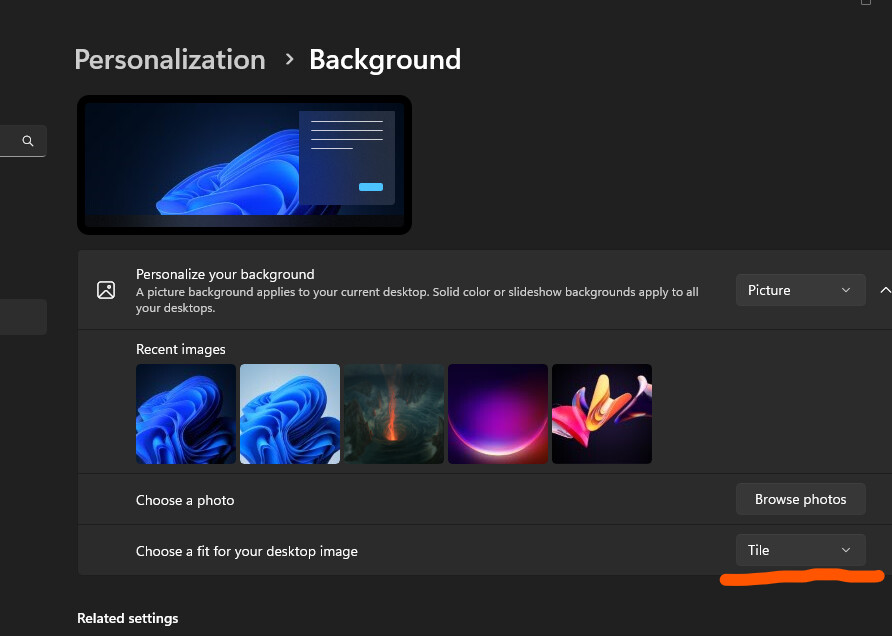
See [Fix Wallpaper not shown if using tiled background (e2790b9f) · Commits · Elias Steurer / ScreenPlay · GitLab](https://gitlab.com/kelteseth/ScreenPlay/-/commit/e2790b9fa2e5b98ba0cdc36a9dd9dbbd33dcae9a)
---
### Author:  [@Kelteseth](https://forum.screen-play.app/u/Kelteseth)
#### Post date: [September 4, 2023, 3:56pm UTC](https://forum.screen-play.app/t/cannot-set-wallpaper-no-videocodec-was-specified-inside-the-json-object/207/8 "2023-09-04T15:56:25Z")
@BruhOP5 It should be live on the Steam internal branch. Can you check if it works for you? [Frequently Asked Questions - ScreenPlay Docs](https://kelteseth.gitlab.io/ScreenPlayDocs/Frequently%20Asked%20Questions/#how-can-i-enable-steam-nightly-builds)
---
### Author:  [@BruhOP5](https://forum.screen-play.app/u/BruhOP5)
#### Post date: [September 5, 2023, 5:50pm UTC](https://forum.screen-play.app/t/cannot-set-wallpaper-no-videocodec-was-specified-inside-the-json-object/207/9 "2023-09-05T17:50:18Z")
Thanks a lot, I updated but didn’t work I restarted my laptop, used the ‘Close All Content’ buttons and set a random wallpaper 3-4 times, and now it works alright + I can now run community wallpapers which I couldn’t previously. One little line can do a lot ig XD.
---
### Author:  [@BruhOP5](https://forum.screen-play.app/u/BruhOP5)
#### Post date: [September 5, 2023, 6:02pm UTC](https://forum.screen-play.app/t/cannot-set-wallpaper-no-videocodec-was-specified-inside-the-json-object/207/10 "2023-09-05T18:02:27Z")
Just found a similar bug, Screenplay can’t set wallpaper for the first time (no wallpaper is set before changing Windows setting) if Windows background setting is center, but works for every other (Fill, Fit, Stretch, Tile, Span)
---
### Author:  [@Kelteseth](https://forum.screen-play.app/u/Kelteseth)
#### Post date: [September 6, 2023, 6:06am UTC](https://forum.screen-play.app/t/cannot-set-wallpaper-no-videocodec-was-specified-inside-the-json-object/207/11 "2023-09-06T06:06:39Z")
Huh sounds like another bug in the wallpaper transition logic. So how this works is that SP reads your current wallpaper and displays it to make a smooth transition. The problem is that how Windows displays the wallpaper with different modes and different monitor sizes and scaling is quite complicated so this could be another edge case. Will investigate after work, thanks for the port 🙂
---
### Author:  [@CH4OS613](https://forum.screen-play.app/u/CH4OS613)
#### Post date: [December 13, 2024, 10:10am UTC](https://forum.screen-play.app/t/cannot-set-wallpaper-no-videocodec-was-specified-inside-the-json-object/207/12 "2024-12-13T10:10:41Z")
I have the same problem